Kenya · M-Pesa · 18+
9Ubet Registration
Many failed sign-ups have a simple cause, such as a wrong network or a mistyped code. On 9Ubet, you need an active Safaricom line and access to its SMS messages. The form itself has only a few fields. This guide shows what to enter at each step and what to do if a code or error stops you. With your phone at hand, you can open your account and move on to your first deposit.
9Ubet Account Registration Requirements
You need to be at least 18 years old and have an active Safaricom number. You also need to create a password.
| Requirement | Details |
|---|---|
| Minimum age | 18 |
| Country prefix on the form | +254 |
| Supported network | Safaricom |
| Verification | SMS code |
| Referral code | Optional |
| Accounts per player | One |
Age and Location Eligibility
9Ubet accounts are for players aged 18 and over. The platform operates in Kenya, and its registration form uses the Kenyan +254 prefix.
You confirm your age with a checkbox at the end of the form. The same checkbox covers your acceptance of the Terms of Use and the Confidentiality Agreement.
Mobile Number and Account Details
The form asks for your Safaricom number, an SMS code and a password. Airtel and other networks are not currently supported for registration.
Use a line that you actively use. Your number becomes your login, and password resets also use an SMS sent to it. M-Pesa deposits use the same registered number as the account number.
Password and Account Security Requirements
Your password needs a mix of letters and numbers. It must also meet the minimum length shown on the screen.
Follow these rules for a safer account:
- Choose a password that you do not use on other sites.
- Avoid your name, birth date or phone number.
- Do not share your password or SMS codes with anyone.
How to Register on 9Ubet
Registration has four stages and takes place on one form. Your account is created immediately after you submit it.
- Open the registration page.
- Verify your Safaricom number.
- Create your password.
- Accept the terms and submit the form.
Open the Official Registration Page
Go to 9Ubet.co.ke and tap the green Join button at the top of the screen. The Create New Account form opens.
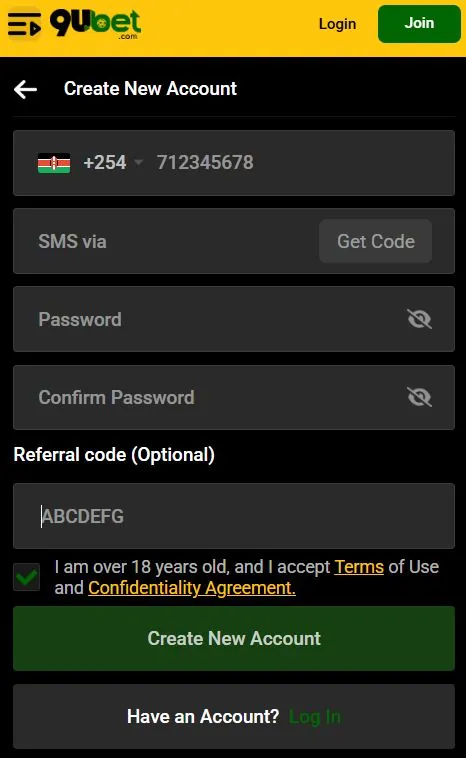
Type the address yourself or use the official app, which reduces the risk of landing on a copied page. If you already have an account, the Log In link at the bottom of the form takes you to the login page.
Enter and Verify Your Mobile Number
Enter your Safaricom number in the first field, after the +254 prefix. The form shows 712345678 as a sample format.
Tap Get Code and wait for the SMS. Then enter the code in the SMS field. Keep the form open while you read the message, so you do not have to fill it in again.
Create a Password and Complete the Form
Enter your password in the Password field and repeat it in Confirm Password. Both entries must match.
The eye icon in each field shows or hides the characters, so you can check for typing errors. The Referral code field comes next. Enter a code only if a friend invited you. Otherwise, leave the field empty.
Review the Terms and Submit Your Registration
Tick the checkbox to confirm that you are over 18 and accept the terms. The Terms of Use and Confidentiality Agreement are linked in the checkbox text, so you can read them first.
Then tap Create New Account. Once your account is ready, you can deposit and place a bet.
9Ubet Registration Problems
Most registration problems involve the SMS code, the number or a form field. Use the table below to find the first action to take.
| Problem | First action |
|---|---|
| SMS code does not arrive | Check the number and your signal |
| Number is already registered | Try to log in or reset your password |
| Form shows an error | Read the message and check each field |
| Problem remains | Contact 9Ubet support |
SMS Code Not Received
An SMS code usually fails to arrive because of a wrong number or a weak network signal. Check both before you request another code.
- Confirm that you entered your number correctly.
- Make sure that the SIM is active and has network coverage.
- Check your SMS inbox for the message.
- Tap Get Code again if the option is available.
- Contact support if the code still does not arrive.
Mobile Number Already Registered
If the form says that your number is already registered, an account probably exists on that number. Try to log in before you contact support.
Tap the Log In link and enter your number and password. If you do not remember the password, tap Forgot Password and reset it by SMS. Do not try to open a second account, because each player may hold only one.
Registration Form Shows an Error
Read the exact error message first, because it points to the field that needs attention. A password can be rejected if it is too short or lacks a mix of letters and numbers.
Check these points before you submit the form again:
- The number belongs to a Safaricom line.
- The SMS code matches the latest message.
- Both password entries match.
- The age and terms checkbox is ticked.
Contact 9Ubet Support for Registration Help
9Ubet support is available 24/7 by phone, WhatsApp and email. Give the team your mobile number and the exact error message.
| Channel | Contact |
|---|---|
| Phone | +254 709 549 599 |
| +254 113 499 999 | |
| [email protected] |
A screenshot of the error can help the team find the cause faster.
What to Do After Registration
Your next steps are to log in, check your account details and make a deposit. You can then start betting on sports or casino games.
Log In to Your 9Ubet Account
Tap Login and enter your registered number and password. Then tap Log In.
The Keep me logged in checkbox saves you from entering your details each time. Use it only on your personal device. You can sign in through the mobile site or the 9Ubet Android app from Google Play.
Review Account Details and Security Settings
Open your profile to find your account options, including Withdraw. Bet History shows your placed bets, stakes, odds and statuses.
Make sure that you always have access to your registered SIM, because password resets go to that number. If you need a break from betting, support can guide you through account deactivation or self-exclusion.
Learn About Deposits and Account Limits
The minimum deposit is KES 10 through M-Pesa, and 9Ubet does not charge a deposit fee. Use Paybill 989878 with your registered number as the account number.
| Item | Rule |
|---|---|
| Minimum deposit | KES 10 |
| Paybill number | 989878 |
| Account number | Your registered 9Ubet number |
| Withdrawals | Within the allowed minimum and maximum limits |
| Betting on credit | Not available |
After your first deposit, the Promotions page shows the current offers. Check the conditions of each offer, and bet only with money you can afford to lose.
Frequently Asked Questions
These short answers cover the most common questions about opening a 9Ubet account.
How Do I Register on 9Ubet?
Tap Join on 9Ubet.co.ke, enter your Safaricom number and verify it by SMS. Then create a password, accept the terms and tap Create New Account.
What Details Are Needed to Create a 9Ubet Account?
You need a Safaricom number, the SMS code and a password. A referral code is optional.
Can I Register With an Airtel Number?
No, 9Ubet registration currently supports Safaricom numbers only. You need an active Safaricom line to create an account.
What Should I Do if I Do Not Receive the SMS Code?
Check your number and network signal, then request the code again if the option is available. If it still does not arrive, contact 9Ubet support.
Can I Create More Than One 9Ubet Account?
No, each player may hold only one 9Ubet account. Multiple accounts can lead to disqualification and lost bonuses.
How Do I Contact 9Ubet About a Registration Problem?
Call +254 709 549 599 or message WhatsApp at +254 113 499 999. You can also email [email protected] at any time.