Kenya · M-Pesa · 18+
9Ubet Login
A single wrong digit in your mobile number can block access to your 9Ubet account. The login form needs only your registered number and password, so most errors are quick to fix. This guide gives you the exact steps for signing in and resetting a password. Keep your phone nearby and you can get back to your bets and account balance.
How to Log In to Your 9Ubet Account
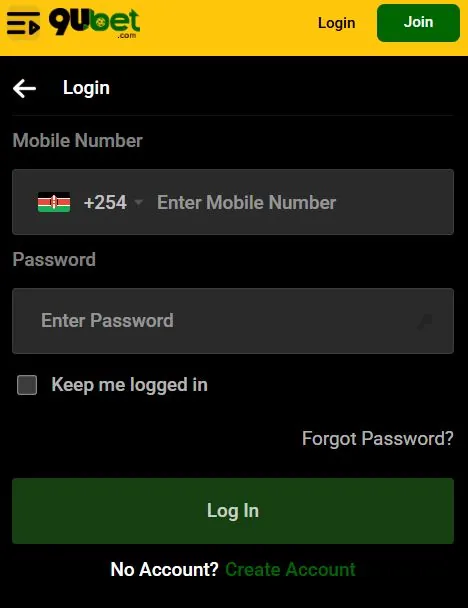
To log in, open the 9Ubet login page and enter your registered mobile number and password. Then tap Log In.
| Field or option | What to do |
|---|---|
| Mobile Number | Enter your registered number after +254 |
| Password | Enter your current password |
| Keep me logged in | Tick it only on a personal device |
| Forgot Password? | Tap it if you need a new password |
Open the Official 9Ubet Login Page
Go to 9Ubet.co.ke and tap Login at the top of the screen. The link sits next to the green Join button.
Type the address yourself to avoid copied pages. You can also sign in through the 9Ubet Android app from Google Play. Use the same number and password that you created during registration.
Enter Your Registered Mobile Number and Password
Enter your number in the Mobile Number field after the +254 prefix. Then enter your password and tap the green Log In button.
Use the number that you registered with 9Ubet. A different line will not open your account. If you are on your own phone, you can tick Keep me logged in to skip this step next time.
How to Reset Your 9Ubet Password
You can reset your password with an SMS code sent to your registered number. You need access to that SIM to complete the process.
- Tap Forgot Password? on the login form.
- Enter your registered mobile number.
- Enter the code from the SMS.
- Choose a new password.
Select the Forgot Password Option
The Forgot Password? link is on the login form, just above the Log In button. Tap it to start the reset.
You do not need to contact support for a standard reset. Support is useful if the reset does not solve the problem.
Verify Your Mobile Number
Enter your registered mobile number, and 9Ubet will send a verification code by SMS. Type this code into the reset form.
Check that the number is correct before you continue. The code goes only to the number you enter. Do not share this code with anyone.
Create a New Password
Your new password needs a mix of letters and numbers. It must also meet the minimum length shown on the screen.
Choose a password that you do not use on other sites. If the form rejects it, note the exact error message. Support can use this message to check the problem.
9Ubet Login Problems
Most login problems come from incorrect details, an undelivered SMS or a connection issue. Use this table to find the first action to take.
| Problem | First action |
|---|---|
| Invalid credentials | Check your number and reset your password |
| SMS code does not arrive | Check your number and network signal |
| User not found | Confirm that you entered the registered number |
| Account restricted | Contact support |
| Page does not load | Check your connection and reload the page |
Incorrect Mobile Number or Password
An "invalid credentials" message means that the system did not accept your login details. Check both fields and try again.
Follow this order:
- Confirm your registered mobile number.
- Retype your password carefully.
- Reset your password if the error remains.
- Contact support if the reset does not help.
SMS Verification Code Not Received
A missing code usually points to an incorrect number or a weak network signal. Check both before you request another code.
Make sure that the SIM is active and that your phone has coverage. Then check your SMS inbox. If the code still does not arrive, contact support with your registered number.
Account Not Found or Temporarily Restricted
A "user not found" message means that the system cannot find an account with the number you entered. Check for typing errors first, and then try any other number you may have registered.
A restriction needs a review by support, because you cannot remove it from the login form. Give the team your registered number and the exact message on your screen. Accounts can be limited under the 9Ubet rules, including the one-account rule and the bonus abuse rules. A self-excluded account also stays blocked during the exclusion period.
Login Page Not Loading
If the login page does not load, the cause is often your connection or browser. Try these steps in order:
- Check your mobile data or Wi-Fi.
- Reload the page.
- Close the browser and open 9Ubet.co.ke again.
- Update the app if you use the Android version.
- Switch between the app and the mobile browser.
If the page still does not open, contact support and describe what appears on your screen.
9Ubet Account Security
You protect your account by keeping your password and SMS codes private. It also helps to log out after using a device that other people can access.
Protect Your Password and Verification Code
Your password and SMS code give access to your 9Ubet account, so keep them to yourself. Never send them in a chat or a social media message.
Follow these simple rules:
- Use a unique password for 9Ubet.
- Avoid your name, birth date or phone number.
- Keep your M-PESA PIN private.
- Use only the official 9Ubet contact details.
Log Out on Shared Devices
Always log out when you finish a session on a shared device. Leave the Keep me logged in box unticked on that device.
This step stops the next user from opening your account and bet history. Also avoid saving your password in a browser that other people use.
Contact Customer Support About Account Access
9Ubet support is available 24/7 by phone, WhatsApp and email. Have your registered number and a screenshot of the error ready.
| Channel | Contact |
|---|---|
| Phone | +254 709 549 599 |
| +254 113 499 999 | |
| [email protected] |
Tell the team which steps you have already tried. Once your access is restored, you can return to your bets and promotions.
Frequently Asked Questions
These short answers cover the most common questions about 9Ubet account access.
How Do I Log In to 9Ubet?
Go to 9Ubet.co.ke and tap Login. Enter your registered mobile number and password, then tap Log In.
How Can I Reset My 9Ubet Password?
Tap Forgot Password? on the login form and enter your registered number. Enter the SMS code and choose a new password.
What Should I Do if I Cannot Log In?
Check your number and password, then reset your password if needed. If the error remains, send support your registered number and the exact message.
Can I Log In to 9Ubet on My Phone?
Yes, you can log in through your mobile browser at 9Ubet.co.ke. You can also use the 9Ubet Android app.
How Do I Contact 9Ubet About a Login Problem?
Call +254 709 549 599 or message WhatsApp at +254 113 499 999. You can also email [email protected] at any time.