Kenya · M-Pesa · 18+
9Ubet App
The 9Ubet app puts sports betting, Aviator and M-Pesa payments in one place on your phone. The key step is choosing a safe download source, because copied files can put your account at risk. This guide shows where to get the app and how to install and update it. Follow the steps below, and you can move from download to your first bet with your existing account or a new one.
9Ubet on your phone
- Android app on Google Play
- App Store badge
- Sports and live betting
- Aviator and casino
About the 9Ubet App
The 9Ubet app is the official mobile application for the Kenyan betting site. You can use it to bet on sports, play casino games and manage your money from your phone.
Main App Features
The app gives you access to the main sections of 9Ubet from one account. The Download App page lists sports and live betting, casino and live games, and faster mobile access.
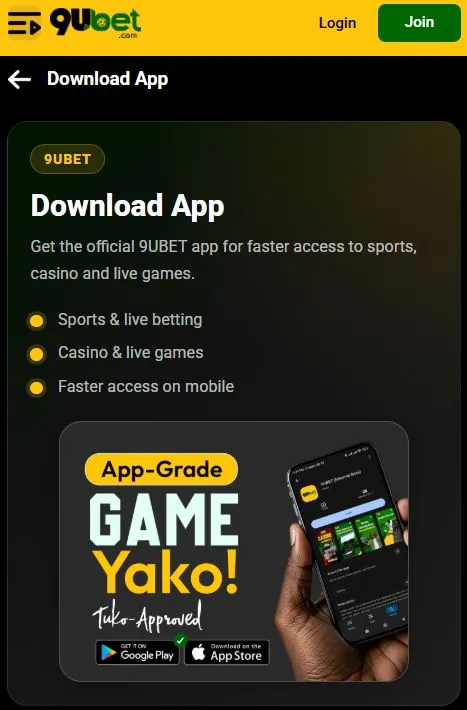
You can use the app for these tasks:
- Placing sports and live bets
- Playing casino games and live tables
- Playing Aviator
- Making deposits
- Requesting withdrawals
Supported Devices
The official 9Ubet app information focuses on Android phones. The Download App page also shows an App Store badge for Apple devices.
| Device | Access option |
|---|---|
| Android phone | Google Play app or mobile browser |
| iPhone | App Store badge on the Download App page or mobile browser |
| Any phone with a browser | 9Ubet.co.ke |
Check the Google Play page for the Android version and storage space that your device needs.
How to Download the 9Ubet App
Download the Android app from the Google Play Store. You can also start from the Download App item in the 9Ubet site menu.
Download the Android App
To get the app, open its Google Play listing from the official 9Ubet site. This route helps you avoid copied listings.
- Open 9Ubet.co.ke in your phone's browser.
- Tap More in the menu and find Download App.
- Tap the Google Play badge.
- Check the listing and tap Install.
How to Install the 9Ubet App
On Android, Google Play installs the app for you. You only need to confirm the installation and wait for it to finish.
Install the APK on Android
An APK is the file format that Android uses to install apps. When you tap Install in Google Play, the store handles this file automatically, and you do not need to change your phone's security settings.
The official instructions direct you to Google Play, so use it instead of an APK from another site. A file from an unknown site can be modified. If a site asks you to allow installation from unknown sources, close the page and return to the official route.
Update or Remove the App
You can update or remove the app through Google Play. Updating can also solve some loading problems.
To update the app:
- Open Google Play.
- Search for the 9Ubet app listing.
- Tap Update if the button appears.
To remove the app, open the same listing and tap Uninstall. Removing the app does not close your 9Ubet account. To close or pause your account, contact support.
How to Use the 9Ubet App
The app uses the same 9Ubet account as the website. Once you sign in, you can bet, manage payments and find help.
Register or Log In
New players can register in the app with a Safaricom number. Existing players can log in with their registered number and password.
Registration requires an SMS code and a password. You do not need a second account for the app, because each player may hold only one. If you forget your password, use the Forgot Password option and verify your number by SMS.
Browse Sports and Casino Games
The app gives you access to sports, live betting, casino games and live tables. Aviator is also available.
To place a sports bet, choose a match and tap the odds. Then enter your stake on the bet slip and tap Place Bet. Popular markets include 1X2, Over/Under and Both Teams to Score.
Manage Deposits and Withdrawals
You can fund your account with M-Pesa and request withdrawals from your account. The minimum deposit is KES 10, and 9Ubet does not charge a deposit fee.
| Operation | Key details |
|---|---|
| Deposit | Paybill 989878, with your registered number as the account number |
| Withdrawal | Profile icon, then Withdraw |
| Withdrawal methods | M-Pesa or Airtel Money |
Most deposits reflect instantly. Most withdrawals are processed quickly, depending on your mobile money provider.
Find Account and Support Options
Your bet history shows your stakes, odds, statuses and payouts. Support is available 24/7 for account and payment questions.
| Channel | Contact |
|---|---|
| Phone | +254 709 549 599 |
| +254 113 499 999 | |
| [email protected] |
Have your registered number and any relevant screenshot ready when you contact the team.
9Ubet App Safety and Troubleshooting
The safest approach is to install the app from Google Play through the official site. Most other problems can be fixed with a few basic checks.
Verify the App's Publisher and Source
Before you install the app, check that the link came from 9Ubet.co.ke. Then read the developer name and app details on the Google Play page.
9Ubet is operated by Glostar Trading Co Limited. If the listing looks unclear, ask support to confirm it before you install anything. Never enter your password in an app from an unverified source.
Fix Download and Installation Problems
Download problems often come from a weak connection or a lack of storage. Try these steps in order:
- Check your mobile data or Wi-Fi.
- Free up storage on your phone.
- Restart your phone.
- Open the listing from the 9Ubet site again.
- Tap Install again.
If the app still does not install, you can use 9Ubet.co.ke in your mobile browser.
Resolve App Errors and Connection Issues
If the app does not open or load, check your connection first. Then close the app and open it again.
These steps can also help:
- Update the app in Google Play.
- Restart your phone.
- Remove the app and install it again.
- Try logging in through the mobile browser.
If an error remains, send support the exact message and your registered number.
Frequently Asked Questions
These short answers cover the most common questions about the 9Ubet app.
Is the 9Ubet App Available for Android?
Yes, the 9Ubet Android app is available on the Google Play Store. It covers betting, Aviator, deposits and withdrawals.
How Do I Download the 9Ubet App?
Open Download App on 9Ubet.co.ke and tap the Google Play badge. Then tap Install on the listing.
Does 9Ubet Have an iPhone App?
The 9Ubet Download App page shows an App Store badge for Apple devices. iPhone users can also bet through the mobile browser at 9Ubet.co.ke.
Can I Use 9Ubet in a Mobile Browser?
Yes, you can open 9Ubet.co.ke in your phone's browser. You do not need to install anything.
How Do I Update the 9Ubet App?
Open the 9Ubet listing in Google Play. Tap Update if the button appears.
What Should I Do if the App Does Not Open?
Check your connection, restart the app and install any available update. If the problem remains, contact 9Ubet support.